How bookings work
Payment confirms a booking. Unpaid ones release after 30 minutes. Only Rento cancels paid ones.
Available onWebsiteiPhoneAndroid
Customers book and pay part of the price online. The payment confirms the booking, so there's nothing for you to accept.
From booking to return
The customer pays
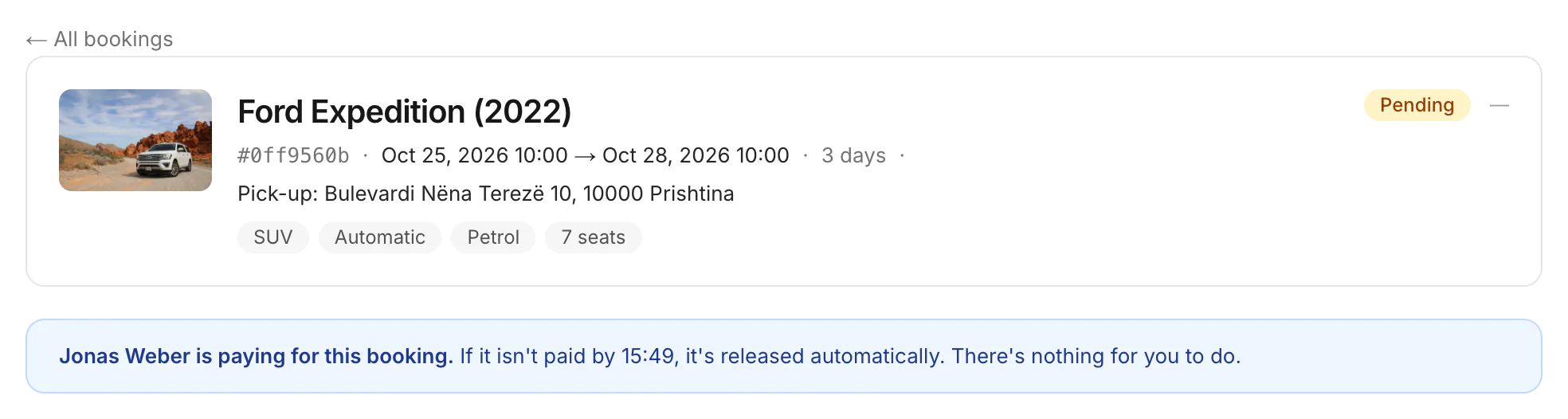
While they pay, the dates are held for them for up to 30 minutes. If they don't pay in time, the booking is released and the dates are free again.
Confirmed
Once they've paid, the booking is confirmed. Its rental contract is drawn up, and it goes out for signing when the renter's details are complete (unless you've switched automatic sending off).
On rental
At pick-up, collect the rest of the price and mark the car Picked up.
Completed
When the car comes back, mark it Returned. Hand over and take back a car
While the customer pays
Statuses
| Dashboard | Apps | What it means |
|---|---|---|
| Pending | Awaiting payment | The customer is paying. |
| Confirmed | Confirmed | Paid. Hand the car over on the start date. |
| Active | On rental | The customer has the car. |
| Completed | Completed | The car is back. |
| Cancelled | Cancelled | Not paid in time, or cancelled by Rento. |
| Declined | Declined | Didn't go ahead: another customer paid for the dates first, or the car became unavailable. |
Good to know
- Only Rento can cancel a confirmed booking. If something has to change, contact Rento support.
- What was paid online and what to collect are on each booking, under Charges. Find and open bookings
Still need help? Contact Rento support from your company dashboard.